HitDM
Lead playbook
Instagram lead capture from comments (with auto DM)
By Amit Dobal, founder of HitDMUpdated
A comment is a raised hand. A lead is a contact you can follow up outside Instagram. This playbook covers a compliant DM flow from keyword comment to email or phone, with honest HitDM limits by plan. Asking for an email inside the chat is live on every plan. Follow to unlock (a follow ask before the link) is live on Pro and above.
To capture leads from Instagram comments, run a keyword comment-to-DM flow on a Business/Creator account, send one private DM that delivers value, then collect email or phone only after (or as part of) that conversation (in the chat with HitDM, or on your landing page), respecting Meta’s one private-reply and messaging-window rules.

Can HitDM detect leads in Instagram DMs?
HitDM does not guess who is a lead. It captures them: your automation asks for an email in the DM on every plan, or a phone number on Pro and up, checks it, and saves it to your Leads page with its source trigger. On Pro and up you can also tag chats with labels such as Hot lead.
- 25leads total on Free, email
- 5,000leads a month on Pro, with CSV export
- 25,000leads a month on Business, plus Google Sheets
Plans and limits are on the lead capture feature page.
Why comments are better warm leads than cold DMs
Someone who typed your keyword already showed intent. That is different from unsolicited outreach. Delivering the offer in the inbox also beats sending them on a bio scavenger hunt. For basics of the automation category, see Instagram DM automation basics. For whether the pattern is allowed on Meta’s APIs, see Is Instagram DM automation allowed?.
Warm does not mean frictionless. You still get one private reply per comment in the usual Private Replies model, so the opener has to earn the next reply if you want an email or phone in-thread.
Live today vs coming soon (honest HitDM scope)
Lead-gen language online often mixes clicks, emails, follow gates, and story funnels. Here is what HitDM does today versus later, so you do not buy the wrong job.
| Capability | HitDM status | Notes |
|---|---|---|
| Comment keyword → private DM | Live (all plans) | Core Instagram auto DM job |
| Tracked link in the DM | Live (all plans) | Measures clicks; a click is not a saved contact |
| Email / phone ask in the DM thread | Live: email and phone on all plans | Asked before or after the link. Free 25 leads total, Starter 100 leads a month, Pro 5,000 leads a month, Growth 10,000 leads a month, Business 25,000 leads a month |
| Leads page + CSV export | Live: Leads page on all plans; CSV on Pro and up | Every saved email or phone shows up on your Leads page |
| Send leads to Google Sheets and other apps | Live on Business | Each new lead becomes a row; older leads copy over in one click |
| Follow-to-unlock / growth gate | Pro (Growth Gate) | Followers get the link after the tap. Others get a follow ask. |
| Story reply → lead funnel | Story reply sends the DM and link and can ask for an email | Story reply trigger live on all plans |
| Full CRM / multi-channel suite | Not HitDM’s job today | CSV export to your own tools; ManyChat-class if you need that now |
What runs today: comment → tracked link in DM, plus an optional email ask in the same chat. Turn on Ask for email in an automation and HitDM asks either before the link (the link arrives right after they answer; only for Tap to get link and Follow to unlock flows) or after it (the question rides in the same message as the link). Instagram has no one-tap email button in DMs, so people type it. HitDM checks the answer, saves it to your Leads page and sends a thank-you. A wrong answer gets up to 2 retries, there is a Skip option, and if they ignore the question nothing more is sent. Story reply and DM keyword triggers are live on all plans. A follow ask before the link is Pro, not Free.
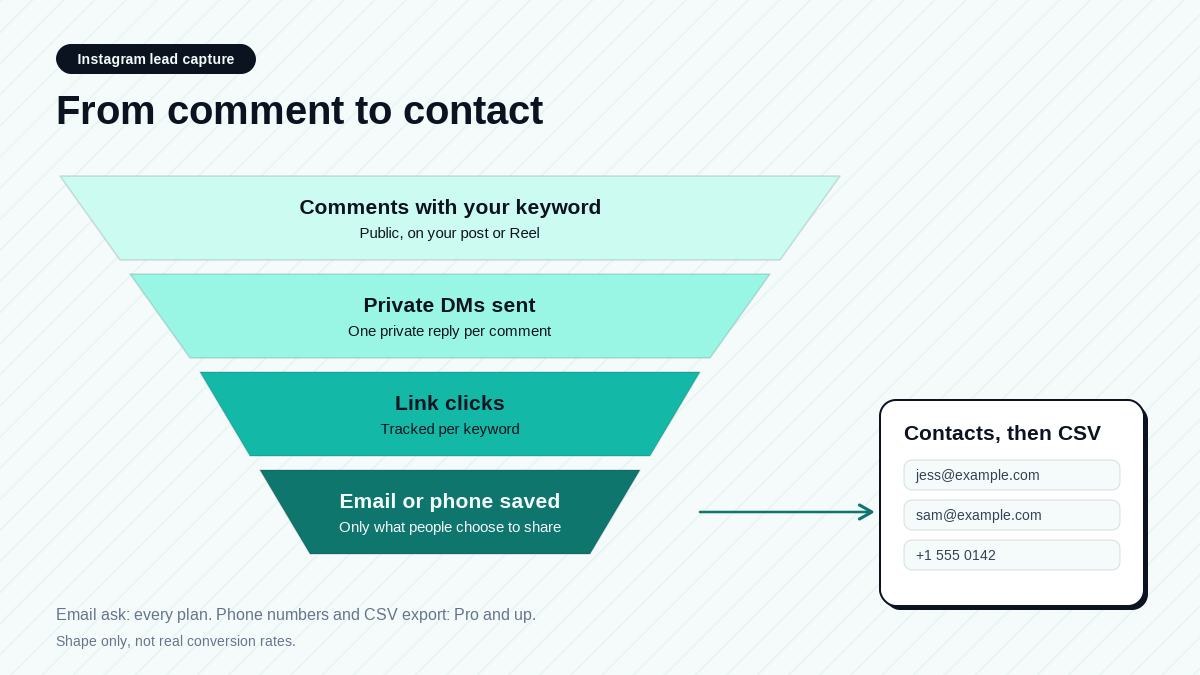
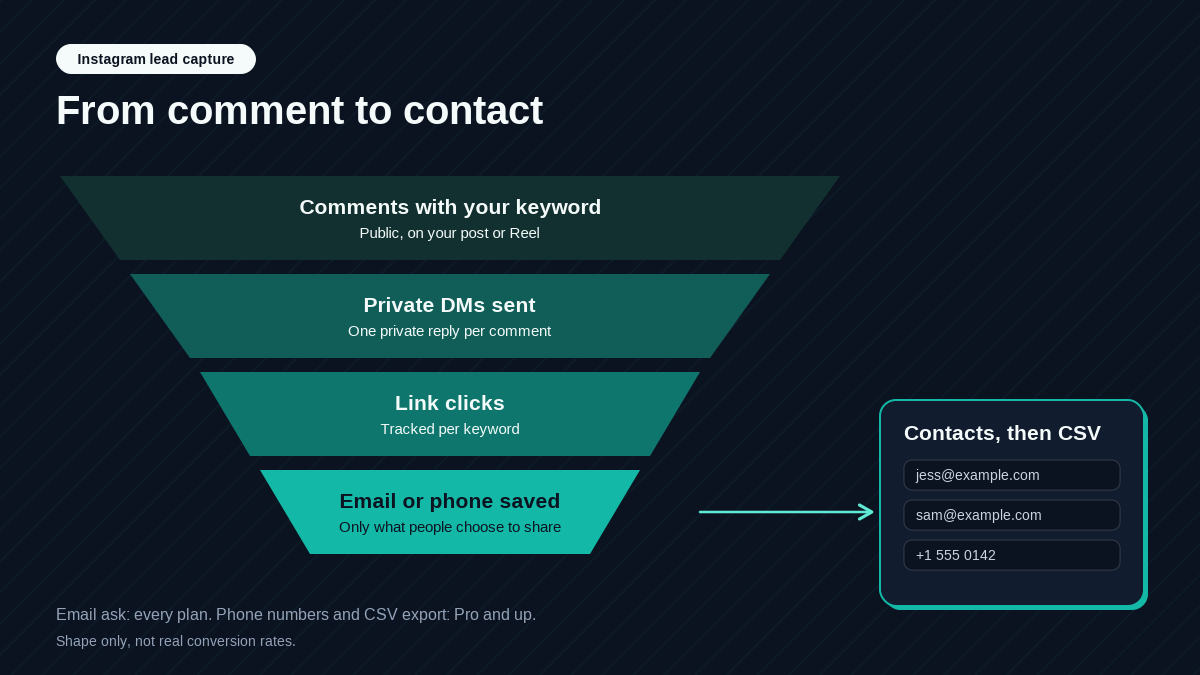
The lead-capture funnel (comment → DM → contact)
- 1 of 4Viewer comments the keyword
- 2 of 4First DM delivers the link
- 3 of 4The DM asks for an email
- 4 of 4Saved to your Leads page
- Caption CTA names the keyword
- Viewer comments the keyword
- Optional public reply (“check your DMs”)
- First private DM delivers value (often a tracked link)
- User replies (opens the conversational window for follow-ups)
- You capture email/phone (in the chat with HitDM, or on your landing page)
- You store or export for follow-up outside Instagram
HitDM covers every step through the Leads page. Free saves 25 leads total (email); Starter 100 leads a month; Pro 5,000 leads a month with CSV export. Setup for the delivery step: set up comment to DM.
Meta rules that shape your sequence
| Rule | Lead-gen implication |
|---|---|
| One private reply per comment | Do not spend the only automatic DM on “reply YES” with zero value if drop-off is high |
| Generally within 7 days | Automations should fire promptly while interest is warm |
| Follow-ups need a user reply | Email/phone asks usually work after the person replies to your opener |
| Professional account | Business or Creator required for official comment-to-DM |
Source: Meta Private Replies. Disclose automation when Meta’s current messaging policies require it. This is practical guidance, not legal advice.
Step-by-step setup checklist

- Step 1: Offer designChecklist, discount, booking, or PDF, something worth a comment
- Step 2: Keyword + caption CTAOne clear word; avoid noisy generics on huge posts
- Step 3: Comment-to-DM automation liveOn a Professional account via Meta connect
- Step 4: First DM copyValue + tracked URL + clear next ask
- Step 5: Capture stepTurn on Ask for email or phone in HitDM, or a form on your landing page
- Step 6: Consent lineWhat you will send (newsletter, SMS restock, booking follow-up)
- Step 7: TestTest with a second account; confirm DM, link, and capture before promoting
- Step 8: Export / processLeads for CRM or email tool when you need them outside Instagram
Copy templates (comment → DM → lead)
Creator freebie
First DM: “Your free [guide] is here: [tracked URL]. Want the PDF emailed? Reply with your best email and I’ll send it.”
Follow-up after they reply with an email: “Got it, sending now. You’re also on the list for [what you’ll send]. Reply STOP if you want off.”
Coach booking qualify
First DM: “Here’s my booking link: [URL]. If you’d rather I follow up, reply with your email and the time zone you’re in.”
Qualify ask (after reply): “Thanks! What is the top outcome you want from a call? I’ll use that to prep.”
D2C drop / waitlist
First DM: “Early access link: [tracked URL]. Prefer a text when we restock? Reply with your phone (and ‘YES’ to SMS).”
Keep SMS consent explicit. HitDM saves the phone number (every plan); it does not send SMS for you. If you cannot honor SMS, ask for email instead.
Keep the sequence human and testable. HitDM has no AI agent scripts; AI replies only answer questions from your FAQ.
Two honest paths: landing-page leads vs in-DM leads
| Path | Works on HitDM Free? | Best when |
|---|---|---|
| Tracked DM link → form on your site | Yes | You already have a landing page / checkout / waitlist |
| Email/phone captured in the DM thread | Yes, email or phone, 25 leads total | You want the contact without leaving Instagram |
Tracking and hygiene
- Use tracked links to see which keyword/post drove clicks
- Tag campaigns; don’t merge every launch into one keyword forever
- Keep “clicked” separate from “gave email”: clicks are in link stats, emails are on the Leads page
- Export leads as CSV (Pro and up) when you need them in your CRM or email tool
- Do not invent open rates or conversion percentages until you measure them
Mistakes that kill conversion
- Asking for email before any value in the first DM
- Vague keywords on noisy posts (“link”, “yes”) without a clear offer
- Unofficial password bots posing as “safer automation”
- Skipping consent language for email/SMS follow-up
- Comparing contact-metered suites to HitDM without checking public pricing pages
Tool notes for Instagram-only lead capture
ManyChat can capture leads inside broader chatbot flows and bills on a contact / people meter; verify live on manychat.com/pricing. LinkDM and InstantDM are Instagram-first peers with their own free caps and lead features; verify on their pricing pages (snapshot context as of 2026-11-14 on our ManyChat alternative page). HitDM meters every plan in DMs you send: Free 1,000 DMs / month; paid plans from Starter $6 / month with unlimited DMs under fair use. In-chat lead capture is live with a per-plan lead limit (Pro: 5,000 leads a month). We do not publish fake ranking or user-count claims.
HitDM for comment leads
Free: Instagram comment to DM + tracked link (1,000 DMs) and 25 leads total (email). Starter: 100 leads a month (email). Pro ($9): 5,000 leads a month with email, phone and CSV export. Growth: 10,000 leads a month. Business: 25,000 leads a month, and it can send leads to Google Sheets and your own apps. See HitDM pricing. Flatter than ManyChat contact billing for Instagram-only list building for many creators. Compare live features before you pick. Deep setup: comment to DM guide.
Pre-launch checklist (copy into your notes)
- □ Offer + keyword written in the caption
- □ Professional Instagram connected through Meta (no password bot)
- □ First DM includes tracked URL + human tone
- □ You chose where to capture: in the DM (Ask for email) or on your landing page
- □ Consent line matches what you will actually send
- □ Second-account test passed
- □ You picked the trigger: comment, story reply or DM keyword. A follow ask is Pro only.
FAQ
Can HitDM detect leads in Instagram DMs?
HitDM does not guess who is a lead. It captures them: your automation asks for an email in the DM on every plan, or a phone number on Pro and up, checks it, and saves it to your Leads page with its source trigger. On Pro and up you can also tag chats with labels such as Hot lead.
Can I collect emails in Instagram DMs?
Yes. In a HitDM automation, turn on Ask for email. HitDM asks inside the Instagram chat, before or after the link. The person types the email (Instagram has no one-tap email button in DMs). HitDM checks it, saves it to your Leads page and sends a thank-you.
Do I need ManyChat to capture Instagram leads?
No. Instagram-first comment-to-DM tools can do it. See HitDM as a ManyChat alternative for Instagram leads.
Is lead capture on HitDM free?
Yes, with a small limit. Free saves 25 leads total, Starter 100 leads a month, Pro 5,000 leads a month, Growth 10,000 leads a month and Business 25,000 leads a month, all with email and phone. CSV export starts on Pro.
What’s the difference between a click and a lead?
A click means someone opened your tracked link. A lead means you captured an email, phone, or CRM contact you can follow up outside Instagram.
Are follow gates required?
No. A follow ask is optional. HitDM Pro and up can ask non-followers to follow before the link unlocks.
What does HitDM support today for lead capture?
Comment keyword → private DM + tracked link, plus an optional email ask inside the chat. Story reply and DM keyword triggers are live on all plans. Leads land on your Leads page; Pro and up can export them as CSV. Phone capture is on every plan. Business sends leads to Google Sheets and your own apps. Multi-channel CRM suites are peer features, not HitDM claims.
Can I start lead gen on Free?
Yes. Free sends the tracked link in DM and can ask for an email in the chat, up to 25 leads total. Past that, people can still convert on your landing page, or you can upgrade to Starter (100 leads a month) or Pro (5,000 leads a month).
Is this legal advice?
No. Respect Meta messaging rules and your local consent/marketing laws. Add a clear consent line for what you will send after someone shares email or phone.